Vuqelari
Axis Guide
Axis Guide
Couldn't load pickup availability
- Problem Statement
Many learners begin UI/UX design by looking at finished screens, but finished screens do not always explain why each design choice was made. A page may look clean, yet the learner may not understand how the layout was planned, why one section comes before another, or how the user is guided through the interface. Without a structured method, it can be difficult to separate visual taste from practical design decisions. Some learners also struggle to describe what is wrong with a screen because they do not yet have a clear review process. Axis Guide was created to help learners study UI/UX design through order, observation, and practical interface thinking.
- Solution
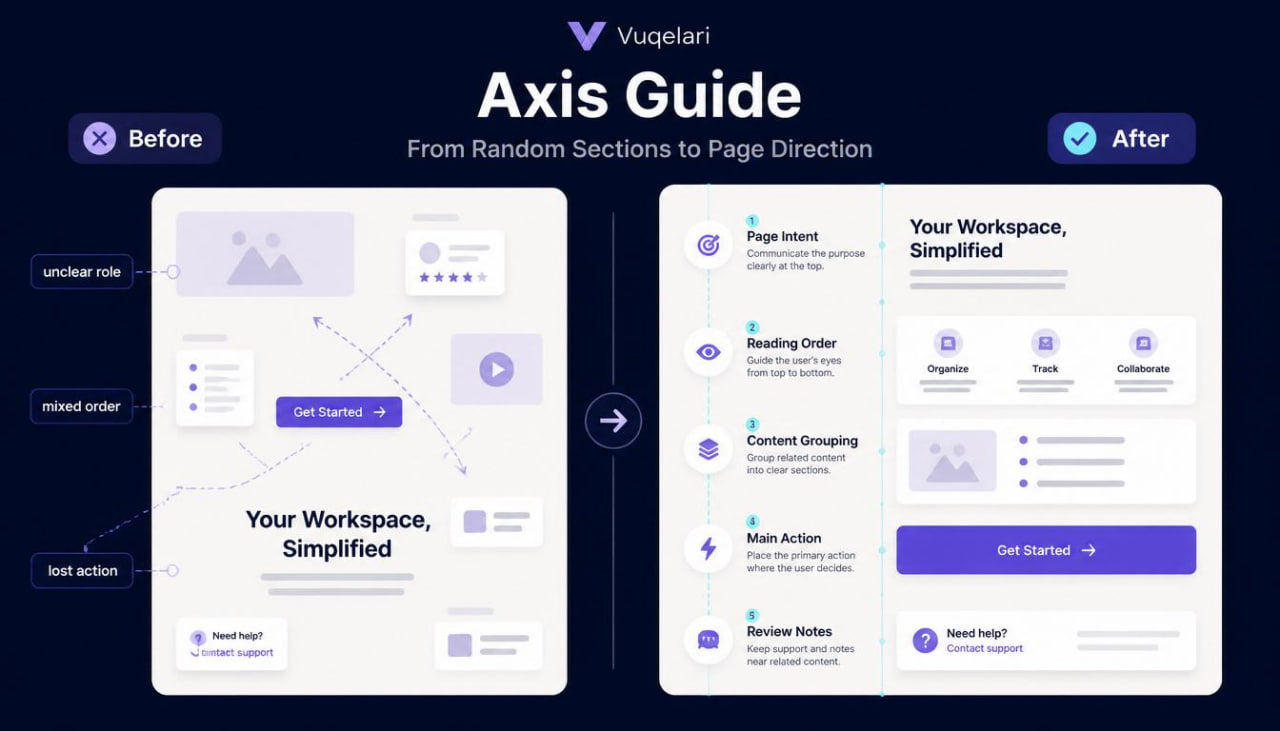
Axis Guide introduces a more organized way to study screens, layouts, and user paths. The course helps learners examine each interface as a set of connected parts: purpose, structure, movement, content, action, and review. Instead of only looking at visual style, learners study why a screen exists and how each element supports the page direction. The materials use written explanations, examples, short tasks, and checklists to make the study process steady and clear. This tier is designed to help learners build a stronger design study routine before moving into wider course collections.
- What’s Inside
Axis Guide includes a structured set of UI/UX design materials focused on screen purpose, layout order, and user path logic. The course begins with a module about interface intent. This section explains how every screen should have a clear role within a larger digital experience. A screen may introduce information, collect details, guide a choice, confirm an action, or help the user compare options. By studying screen intent, learners begin to understand that interface design is not only about arranging shapes and text. It is about giving each page a clear reason to exist.
The next module focuses on layout direction. Learners study how information can be arranged from top to bottom, from general to specific, and from explanation to action. This part covers common page zones such as introduction areas, content blocks, support text, action areas, item groups, and review sections. Each zone is explained as part of a larger reading path. The course shows how a learner can look at a screen and ask: What should be noticed first? What should be read next? Where does the action belong? What information may need more space?
Another section introduces user path planning. Instead of studying one screen alone, the learner looks at how screens connect. This module explains how a person may move from an entry point to an information page, from a form to a confirmation page, or from a selection screen to a review screen. The materials include simple user path diagrams that show movement between steps. These diagrams help learners understand that UX design often depends on sequence. A screen can be visually neat but still feel confusing if the movement between steps is unclear.
Axis Guide also includes a module about content grouping. This section explains how related information should be placed together so the interface feels organized. Learners study examples of grouped text, button areas, input fields, navigation blocks, and content cards. The course explains how grouping can make a screen easier to read, while scattered information may create friction. This module also introduces spacing as a design decision. Spacing is presented not as decoration, but as a way to separate topics, show relationships, and support reading rhythm.
The course continues with a section on action clarity. Learners study how buttons, links, form fields, and selection areas guide the user. The materials explain how action labels should be direct, how placement can affect understanding, and why one primary action often needs stronger visual attention than secondary actions. This part includes small comparison examples where learners review different action placements and describe which version feels more understandable.
A practical wireframe module is also included. Learners are guided through the planning of a simple page using blocks, labels, notes, and section names. The task begins with defining the page purpose, then moves into listing content, grouping related elements, arranging sections, and placing the main action. This exercise helps learners practice structure before thinking about final visual details.
Axis Guide includes several short review tasks. One task asks learners to review a simple interface and identify its main purpose. Another task focuses on finding the primary user action. A third task asks learners to describe the page flow in plain language. These exercises help connect reading with practical observation.
The tier also includes a layout review checklist. The checklist includes questions about page intent, section order, information grouping, action placement, spacing, and user movement. It can be used while reviewing practice screens or while planning a new interface idea.
A glossary section is included with terms such as page intent, user path, content grouping, primary action, secondary action, wireframe, layout rhythm, reading order, and interaction point. Each term is explained with short UI/UX context so learners can use the vocabulary while studying.
The course ends with a recap module that gathers the main ideas into one study framework: define the screen purpose, arrange information in a logical order, guide the user through clear actions, and review the layout before adding final visual styling.
- Who Is This For?
Axis Guide is for learners who already understand the very first ideas of UI/UX design and want a more structured way to study interface layouts. It is suitable for people who want to look at screens with more attention to purpose, order, and movement.
This tier may fit learners who enjoy written materials, practical tasks, and design examples that can be studied at their own rhythm. It is also useful for people who want to practice describing interface choices in a more organized way. The course does not require named software knowledge or previous technical preparation.
Axis Guide is a good match for learners who want to move beyond simple definitions and begin asking better design questions. What is the page trying to do? What should the user notice first? Are related elements grouped together? Does the main action appear in a logical place? These questions form the center of this tier.
- What You’ll Learn
- How to define the purpose of a screen before arranging its content
- How to study page structure through sections, blocks, and action areas
- How to arrange information in a logical reading order
- How user paths connect several screens into one flow
- How to describe user movement from one step to another
- How content grouping supports interface clarity
- How spacing can separate ideas and show relationships
- How to identify primary and secondary actions on a page
- How action placement affects user understanding
- How to create a basic wireframe from a page purpose
- How to use labels and notes when planning a screen
- How to review a layout with practical questions
- How to notice unclear section order or scattered information
- How to explain simple UI/UX decisions in plain language
- How to use beginner design terms with more precision
- How to connect layout, content, and user movement into one study process
- 30-Day Refund Note
Vuqelari includes a 30-day refund window for eligible orders according to the store policy. Learners should review the course materials during this period and contact the support team if the tier does not match their study needs. Refund requests are handled through the store’s regular support process and may depend on order details, delivery status, and the policy information shown on the store page.
Self-paced learning overview
- 🗂️ Digital file available after purchase
- 📚 Long-term availability
- 🔒 Secure checkout
- 🗓️ Content updated in 2026
What format are the Vuqelari course materials provided in?
What format are the Vuqelari course materials provided in?
The Vuqelari course materials are prepared as digital learning resources for self-paced study. They include written modules, visual examples, practice tasks, checklists, and review sections.
Who are the courses made for?
Who are the courses made for?
The courses are made for learners who want to study UI/UX design through organized materials and practical exercises. Each tier has its own depth, from an introductory starting point to wider topic collections.
How do I study after placing an order?
How do I study after placing an order?
After placing an order, you receive the course materials through the store’s normal delivery process. You can study the modules at your own rhythm, return to earlier sections, and use the tasks for review.
Share