Vuqelari
Free Kit
Free Kit
Couldn't load pickup availability
- Problem Statement
Many learners feel interested in UI/UX design but do not know where to begin. Interface design can look complex because it includes layouts, user actions, navigation paths, text structure, visual order, and many small decisions that work together. Without a clear starting point, it is common to jump between random topics and lose the connection between design ideas. Some learners also feel that course materials become too crowded when they begin with too many terms at once. Free Kit was created to give a lighter first step into UI/UX study through a focused set of beginner-friendly materials.
- Solution
Free Kit introduces UI/UX design through simple explanations, small examples, and guided practice notes. It helps learners understand how interface elements are arranged, why user flow matters, and how a screen can be studied as a set of decisions rather than only a visual picture. The materials are structured so the learner can read, pause, review, and return to key points without pressure. Instead of covering every topic at once, this tier gives a compact foundation for further study. It is made for people who want to explore the Vuqelari learning style before choosing a wider course tier.
- What’s Inside
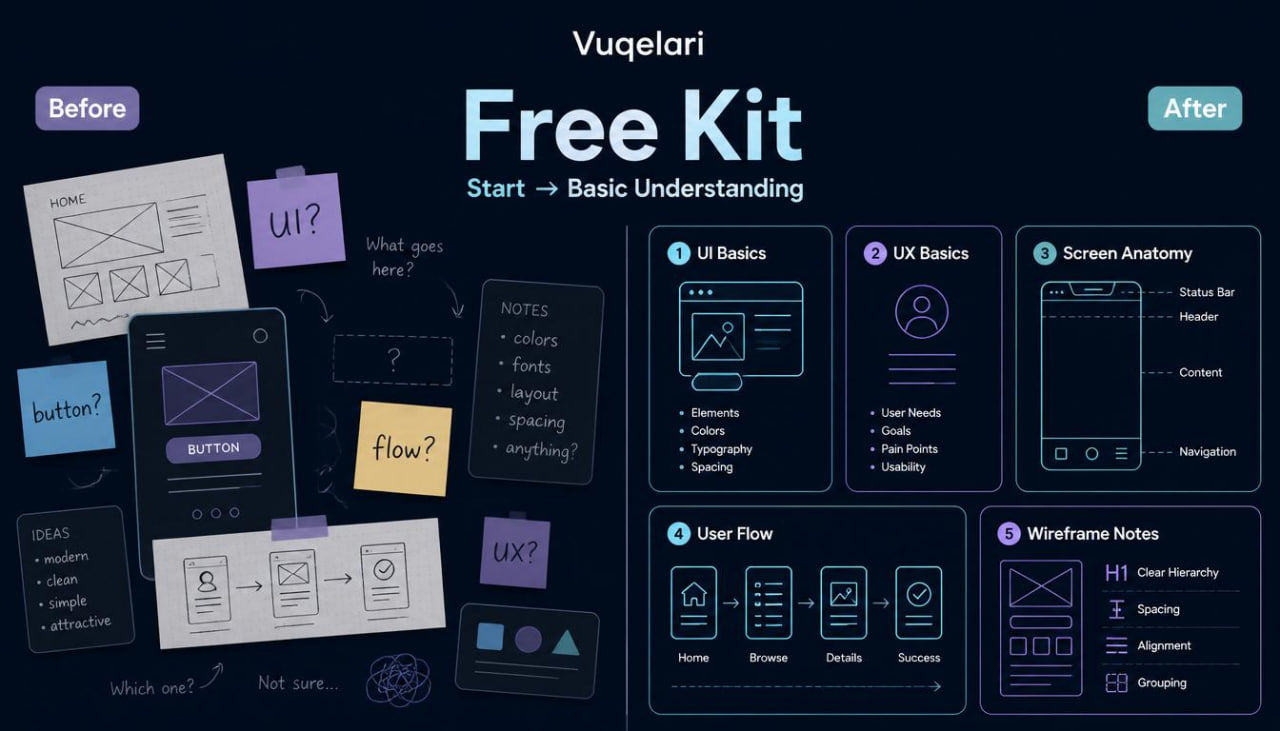
Free Kit includes a compact set of digital UI/UX design materials created for first contact with the subject. The content begins with a short introduction to what UI and UX mean in everyday design practice. It explains the difference between how an interface looks, how it behaves, and how a user moves through it.
The first module introduces screen structure. It covers basic areas such as headers, content zones, action areas, menus, forms, cards, and simple layout blocks. The goal is to help the learner look at an interface as an organized system of parts.
The second module focuses on user flow. It explains how a person moves from one step to another, why every screen should have a clear role, and how unnecessary confusion can appear when actions are not placed thoughtfully. This part includes short examples of simple flows, such as reading information, choosing an option, filling a form, or moving to the next page.
The third module introduces visual hierarchy. It shows how size, spacing, contrast, grouping, and placement can guide attention. The materials explain why some information should be noticed first, why secondary text should support the main message, and how design choices can make a screen easier to understand.
The fourth module includes a small wireframe practice task. Learners are invited to sketch a basic screen structure using blocks, labels, and notes. The task is not about decoration. It is about learning how to arrange information before thinking about final visual details.
Free Kit also includes a short checklist for reviewing a simple interface idea. The checklist covers questions such as: Is the main action clear? Is the page structure understandable? Are related elements grouped together? Does the text guide the user naturally? Is there enough spacing between sections?
A mini glossary is included as well. It explains beginner terms such as layout, wireframe, user flow, hierarchy, component, navigation, interaction, and content block. Each term is written in plain language with a short design-related context.
The tier ends with a recap section. This section helps the learner review the main ideas from the materials and connect them into one picture: UI/UX design is not only about how a screen looks, but also about how information is arranged and how the user moves through each step.
- Who Is This For?
Free Kit is for learners who are new to UI/UX design and want a small introduction before moving into wider materials. It can also be useful for people who have seen interface design examples before but want a more organized way to think about screens, flows, and layout choices.
This tier is suitable for self-paced study. It does not require previous design experience, named software knowledge, or technical preparation. The materials are written for learners who prefer clear explanations, visual thinking, and practice tasks that start from basic ideas.
Free Kit may also fit people who want to understand whether Vuqelari’s course style matches their learning preferences. Since this tier is compact, it gives a simple view of the brand’s approach: structured modules, calm explanations, practical notes, and design tasks based on real interface thinking.
- What You’ll Learn
- How UI and UX differ, and how they work together in digital interface design
- How to look at a screen as a group of structured elements
- How headers, sections, buttons, forms, cards, and text blocks support page meaning
- How user flow describes movement from one step to another
- Why visual hierarchy helps guide attention through a page
- How spacing, grouping, and placement affect screen clarity
- How to read a simple interface and notice its main action
- How to create a basic wireframe using blocks and labels
- How to review a screen idea with a practical checklist
- How to use beginner UI/UX terms in the right context
- How to separate layout planning from final visual styling
- How to study interface examples with a more structured eye
- 30-Day Refund Note
Vuqelari includes a 30-day refund window for eligible orders according to the store policy. The course materials should be reviewed within this period if you need to decide whether the tier matches your study needs. Refund requests are handled through the store’s support process and may depend on the order details, delivery status, and policy conditions shown at checkout or on the relevant store page.
Self-paced learning overview
- 🗂️ Digital file available after purchase
- 📚 Long-term availability
- 🔒 Secure checkout
- 🗓️ Content updated in 2026
What format are the Vuqelari course materials provided in?
What format are the Vuqelari course materials provided in?
The Vuqelari course materials are prepared as digital learning resources for self-paced study. They include written modules, visual examples, practice tasks, checklists, and review sections.
Who are the courses made for?
Who are the courses made for?
The courses are made for learners who want to study UI/UX design through organized materials and practical exercises. Each tier has its own depth, from an introductory starting point to wider topic collections.
How do I study after placing an order?
How do I study after placing an order?
After placing an order, you receive the course materials through the store’s normal delivery process. You can study the modules at your own rhythm, return to earlier sections, and use the tasks for review.
Share