Vuqelari
Pulse Bundle
Pulse Bundle
Couldn't load pickup availability
- Problem Statement
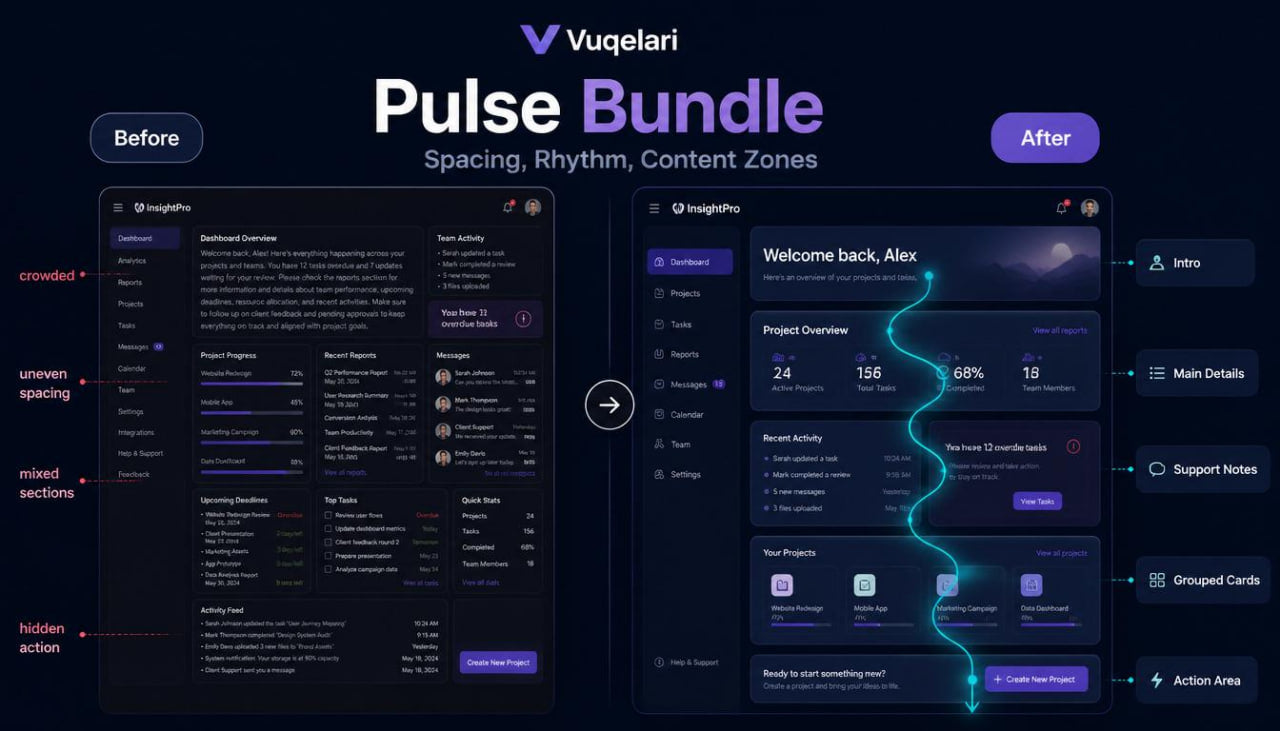
Many learners can recognize a clean interface, but they may still struggle to explain how the screen rhythm works. A page can include useful information, yet the structure may feel crowded, uneven, or unclear when spacing, grouping, and actions are not planned carefully. Learners may also find it difficult to connect content blocks with user movement, especially when a screen contains several sections. Without a deeper review method, design choices can become random instead of purposeful. Pulse Bundle was created to help learners study interface structure with stronger attention to rhythm, section balance, and practical user direction.
- Solution
Pulse Bundle introduces UI/UX design as a connected system of content, layout, movement, and review. The materials guide learners through page rhythm, section order, content grouping, action placement, and simple interface evaluation tasks. Each module explains a design idea, shows how it appears in interface planning, and gives a practical task for review. The tier helps learners move from basic wireframe thinking into more detailed screen organization. It is built for learners who want to study UI/UX design through clear materials, visual examples, and structured exercises.
- What’s Inside
Pulse Bundle includes a detailed set of UI/UX design materials focused on rhythm, structure, and practical interface review. The course begins with a module about screen rhythm. This section explains how spacing, section length, text density, and visual grouping affect how a person reads a page. Learners study how a screen can feel calm when sections have enough room, and how it can feel crowded when too many ideas are placed close together. The module also explains that rhythm is not decoration. It is part of how the interface guides attention.
The next module focuses on content zones. Learners study how a screen can be divided into clear areas: introduction, main information, supporting details, action area, review block, and closing section. Each zone is explained through its role in the page. The introduction helps set context. The main information gives the central message. Supporting details add extra meaning. The action area guides the next step. Review blocks help organize repeated or related content. This module helps learners understand how page sections work together rather than standing alone.
Pulse Bundle also includes a module about visual grouping. This part explains how related elements can be placed close together to show connection. Learners study examples with text blocks, small cards, form areas, feature notes, navigation sections, and comparison rows. The materials explain how grouping can reduce confusion and make a layout easier to scan. Learners are asked to review sample structures and identify which elements belong together.
A separate module covers hierarchy through size, spacing, and order. Learners study how headings, subheadings, body text, labels, and action elements can create a reading path. The course explains how a strong heading can introduce a section, while shorter supporting text can add context without distracting from the main point. This section also includes examples of unclear hierarchy, where everything looks equally important and the user may not know where to begin.
The user direction module connects layout with action. Learners study how a page can guide a person from reading to choosing, from choosing to reviewing, or from reviewing to taking an action. This part explains why action areas should be placed where they feel natural in the reading path. It also introduces the idea of primary and secondary actions in a practical way. Learners compare sample layouts and describe which version gives a clearer path.
Pulse Bundle includes a module about interface consistency. This section explains how repeated patterns help a user understand the structure of a page or a group of pages. Learners study repeated card layouts, consistent button placement, similar spacing between sections, and repeated label styles. The materials explain that consistency can support smoother reading because the user does not need to re-learn the structure at every step.
The course also includes a practical wireframe sequence. Instead of planning only one screen, learners create a small set of connected screen outlines. The task begins with a simple user goal, then moves into defining the needed screens, arranging content zones, placing actions, and checking whether each step follows a clear direction. This gives learners a stronger sense of how screens connect inside a user journey.
Pulse Bundle includes several practice tasks. One task asks learners to review a crowded screen and suggest a cleaner grouping structure. Another task asks them to identify where a main action should be placed. A third task focuses on improving section rhythm by adjusting spacing, order, and content density. These tasks are designed for thoughtful study rather than rushed completion.
The tier also includes review checklists. One checklist focuses on rhythm: Are sections spaced clearly? Does the page feel crowded? Is the reading path natural? Another checklist focuses on action placement: Is the main action visible in a logical area? Are secondary actions separated from the primary action? A third checklist focuses on grouping: Are related elements placed together? Are unrelated ideas separated?
A glossary section is included with terms such as screen rhythm, content zone, grouping, hierarchy, scan path, action area, consistency, layout density, section balance, and user direction. Each term is explained in simple design language and connected to practical interface study.
The recap module brings the course together by showing how rhythm, hierarchy, grouping, and action placement can be used during interface review. By the end of this tier, learners have a broader method for studying screens with attention to structure, movement, and page clarity.
- Who Is This For?
Pulse Bundle is for learners who already understand basic UI/UX ideas and want to study interface organization in more detail. It is suitable for people who want to go beyond simple screen definitions and begin reviewing layouts with stronger attention to rhythm, grouping, and user direction.
This tier may fit learners who enjoy written modules, visual examples, and practical exercises. It is also useful for learners who want to describe design choices more clearly. Instead of saying that a screen “looks good” or “feels confusing,” learners can begin to explain what affects that impression: section order, spacing, hierarchy, grouping, and action placement.
Pulse Bundle is also suitable for self-paced study. The materials do not depend on named software, operating systems, or third-party platforms. The focus stays on interface thinking, screen structure, and practical design review.
- What You’ll Learn
- How screen rhythm affects reading and user movement
- How to divide a page into useful content zones
- How introduction areas, main sections, support notes, and action areas work together
- How visual grouping helps organize related information
- How spacing can separate ideas and create a clearer page structure
- How headings, labels, and text blocks support hierarchy
- How to identify a natural reading path through a screen
- How primary and secondary actions guide user direction
- How repeated patterns support consistency across screens
- How to review layout density and reduce crowded structure
- How to plan a small wireframe sequence with connected screens
- How to describe unclear section order in practical language
- How to use checklists during interface review
- How to connect rhythm, grouping, hierarchy, and action placement
- How to study UI/UX examples with a more detailed review method
- 30-Day Refund Note
Vuqelari includes a 30-day refund window for eligible orders according to the store policy. Learners should review the course materials during this period and contact the support team if the tier does not match their study needs. Refund requests are handled through the store’s regular support process and may depend on order details, delivery status, and the policy information shown on the store page.
Self-paced learning overview
- 🗂️ Digital file available after purchase
- 📚 Long-term availability
- 🔒 Secure checkout
- 🗓️ Content updated in 2026
What format are the Vuqelari course materials provided in?
What format are the Vuqelari course materials provided in?
The Vuqelari course materials are prepared as digital learning resources for self-paced study. They include written modules, visual examples, practice tasks, checklists, and review sections.
Who are the courses made for?
Who are the courses made for?
The courses are made for learners who want to study UI/UX design through organized materials and practical exercises. Each tier has its own depth, from an introductory starting point to wider topic collections.
How do I study after placing an order?
How do I study after placing an order?
After placing an order, you receive the course materials through the store’s normal delivery process. You can study the modules at your own rhythm, return to earlier sections, and use the tasks for review.
Share